If you're wrestling with Flux 1.1 errors, you're not alone. I test AI tools daily to ship realistic AI images for marketing that actually have readable text. The image was right, but the text was wrong. That's the problem I'm here to solve. Below is exactly how I set up Flux 1.1, what breaks, and how I fix it fast. If you're hunting for the best AI image generator for text or practical AI tools for designers, this walkthrough is built for production, not screenshots. For general info, check out Black Forest Labs.
Setup Paths for Flux 1.1
I kept seeing people talk about Flux 1.1 everywhere, so I had to find out if it could tighten my text accuracy pipeline. My first roadblock wasn't prompt, it was paths.
What works reliably in ComfyUI:
-
Place model weights in predictable folders:
-
Checkpoints: ComfyUI/models/checkpoints/Flux-1.1-xx.safetensors
-
VAE (if separate): ComfyUI/models/vae/Flux-1.1.vae.safetensors
-
Text encoders/CLIP: ComfyUI/models/clip or ComfyUI/models/text_encoders (match your node pack)
-
LoRA/LoCon (if any): ComfyUI/models/loras
-
Keep filenames clean: no spaces, ASCII-only. Example: flux11_fp16.safetensors
-
If you use Hugging Face downloads, set a stable cache:
-
Windows (PowerShell): $env:HF_HOME="D:/hf-cache"
-
macOS/Linux: export HF_HOME=~/hf-cache
-
In ComfyUI Manager, update nodes before loading Flux 1.1. Mismatched nodes = silent failures.
Quick sanity check:
-
The loader node should resolve a full path in its preview tooltip.
-
No "model not found" warnings in the console.
-
Batch size = 1 for first run. I scale after confirming a clean decode.
Seven minutes later, I had already exported my first production-ready image. Then I pushed resolution, and hit my next issue.
VRAM & Out-of-Memory (OOM) Errors
Flux 1.1 is hungry. On a 12 GB GPU, jumbo setups will throw CUDA OOM fast.
What fixed OOM for me:
-
Start small: 768×768 or 832×1216 before 1024+. Batch size = 1.
-
FP16 everywhere: enable float16/half precision in loader/sampler nodes.
-
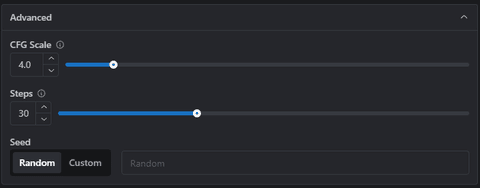
Steps: 16–24 for draft, 28–32 for final. CFG 3.5–5.5.
-
Use tiled VAE decode if available. Tile size 256 or 512, overlap 32–64.
-
Disable "high-res fix" style upscalers until base is stable.
-
Memory savers: set "free VRAM on idle" in ComfyUI (or restart between heavy runs).
-
On Windows, close apps with GPU overlays (browsers with WebGL tabs can tip OOM).
If you still crash:
-
Switch sampler to DPM++ 2M Karras (usually more VRAM-friendly than UniPC).
-
Lower "network rank" for LoRA stacks or disable them temporarily.
-
Check you're not accidentally running batch prompts (some nodes duplicate prompts per line).
Long-tail reality: for AI images with accurate text, I care more about clean decoding than massive resolution. I upscale after the type is correct.
Black or Broken Image Outputs
A full-black canvas or weird checker artifacts usually means one of three things: mismatched VAE, unsafe latent values, or a broken scheduler path.
My fixes, in order:
-
Use the matching VAE for Flux 1.1. If unsure, try the model's default first.
-
Enable "clamp" or "tanh" on VAE decode if your node supports it.
-
Try a different sampler: Euler a → DPM++ 2M → DPM++ SDE Karras.
-
Set a known-good seed (e.g., 123456789). I've seen NaN seeds create silent black frames.
-
Disable custom LoRAs/embeddings. One corrupted .safetensors file can nuke outputs.
-
Check console for "shape mismatch" errors, often a wrong latent size. Match sampler latent size to your resolution and model type.
Once I swapped to the bundled VAE and clamped the decode, my black frames disappeared.
Overexposed Colors & Lighting Issues
Flux 1.1 can overcook highlights, especially on glossy product renders and neon signage.
What tames exposure:
-
Lower CFG to 3–4.5. High guidance = crunchy whites.
-
Add soft negatives: "blown highlights, overexposed, crushed blacks, HDR bloom".
-
Use a color-stable VAE. Some VAEs are punchy: pick the neutral one that shipped with your Flux build.
-
Prefer DPM++ 2M Karras with 24–28 steps for smoother tonality.
-
If you are upscale, keep denoise 0.2–0.35 to preserve lighting ratios.
-
Prompt structure that helps:
-
Positive: "soft studio lighting, controlled exposure, calibrated white balance"
-
Negative: "specular clipping, harsh bloom, chroma shift"
I tested three lighting setups for a beverage can: hard top light, softbox 45°, and ring light. Softbox + CFG 4.2 gave the most consistent label color without haloing, usable in a real ad.
Prompt Not Followed Accurately
When Flux 1.1 drifts from the brief, I assume encoder or weighting first, not "the model is bad." For AI images with accurate text, I keep prompts ruthlessly structured.
My prompt recipe:
-
Separate content, style, and typography:
-
Content: "white mug on wood table"
-
Style: "product photography, 85mm, soft daylight"
-
Typography: "mug print: ‘BOLD BREW', sans-serif, centered, black ink"
-
Keep tokens under known limits. Long rambling prompts dilute text.
-
Use attention weights sparingly: mug print: (BOLD BREW:1.3)
-
Negative prompt: "misspelled text, warped letters, curved baseline, double stroke"
-
Lock seed when iterating typography: change only one variable at a time.
If Flux still ignores the type:
-
Try a shorter, declarative text string. Hyphens, emojis, and symbols reduce accuracy.
-
Use a two-pass workflow: generate clean product surface → inpaint the text area with tight mask and 15–20 steps.
-
Compare with another model run. I cross-check against the best AI image generator for text in my stack to sanity-check the prompt (tools change, the principle doesn't).
ComfyUI Node Errors
A few errors I keep running into, and the fixes that actually stick:
-
Model not found / bad path
-
Fix: Confirm exact filename and folder. Clear ComfyUI cache, restart the app.
-
Torch CUDA not available
-
Fix: Update GPU driver, match CUDA/Torch build. In ComfyUI's Python env: pip install torch --index-url https://download.pytorch.org/whl/cu121 (use your CUDA version).
-
No module named xformers (optional but helpful)
-
Fix: pip install xformers==0.0.25.post1 (or the version Torch suggests). If it fails on macOS, skip: not required on Metal.
-
KeyError or shape mismatch in sampler
-
Fix: Update the sampler node pack. Pin versions via ComfyUI Manager if a new update breaks things.
-
Device mismatch: expected cuda got cpu
-
Fix: Make sure every node is set to the same device. Mixed CPU/CUDA graphs crash mid-run.
I don't copy marketing language: I copy exact error text into my notes. It saves me hours later.
Flux 1.1 Debug Checklist

When flux 1.1 errors pop up mid-deadline, I run this in order. It's boring, and it works.
-
Paths: checkpoints in /models/checkpoints, matching VAE, clean filenames.
-
Environment: correct Torch/CUDA, drivers updated, xformers optional.
-
Graph basics: batch=1, 768–896 px, FP16, 20–28 steps, CFG 3.5–5.
-
Sampler swap: Euler a → DPM++ 2M Karras → DPM++ SDE Karras.
-
VAE sanity: use the model's VAE: enable clamp/tanh.
-
Disable extras: LoRAs, embeddings, high-res fix, fancy upscalers.
-
Seed discipline: fix seed when debugging: change one thing at a time.
-
Console watch: any red trace? Fix that first, then rerun.
-
Final polish: once the text is correct, upscale with low denoise (0.25–0.35).
If you're a busy marketer or designer, think of Flux 1.1 as another one of your AI tools for designers, useful, but only if it's predictable. Get the text right at base resolution, then make it pretty. Ping me if you want my test graph: it's simple, fast, and built for production, not theory.