Last Updated: December 10, 2025 | Tested Version: LongCat-Image Research Release (Dec 2025)
AI tools evolve rapidly. Features described here are accurate as of December 2025.
If you're an independent creator, designer, or marketer, you've probably had this dilemma: you want photorealistic AI images and accurate text, but the best models are either closed, expensive, or too heavy for your hardware.
Meituan's LongCat-Image aims straight at that pain point: a roughly 6B-parameter, open-source, FLUX-style image model that runs on consumer GPUs, speaks multiple languages (including Chinese), and plugs into a broader "LongCat-Omni" ecosystem.
I've spent time digging through the paper, code, and, most importantly, running real prompts. Here's what I actually found, beyond the hype.
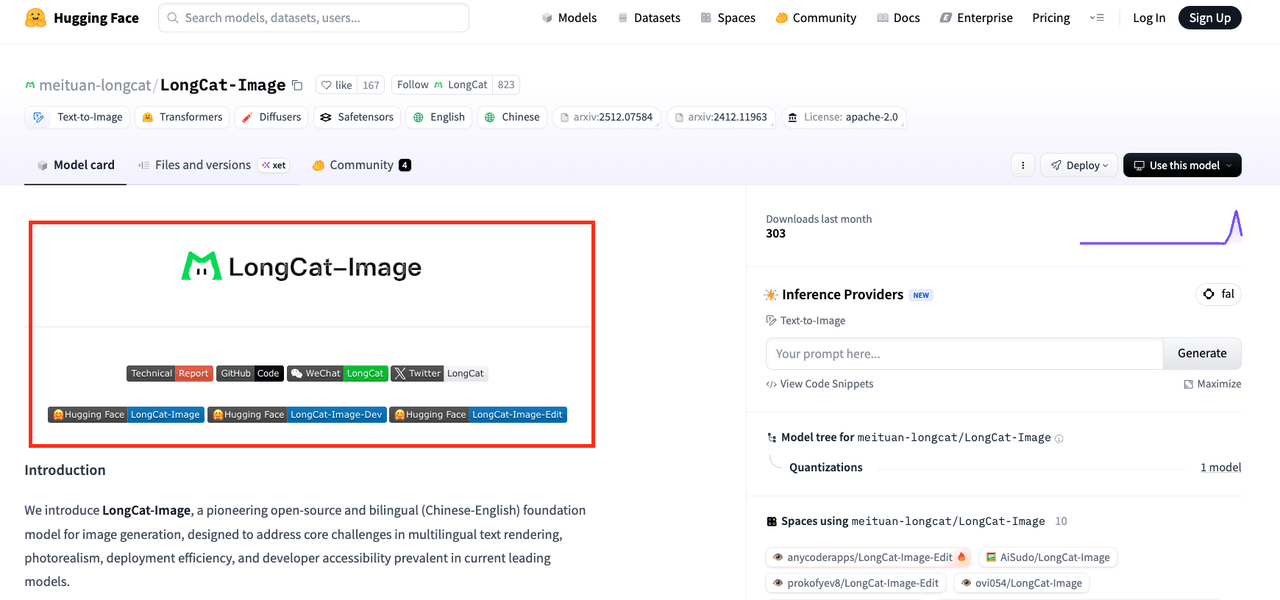
Meituan LongCat-Image Released: A New Challenger in Open Source AI Art
Meituan didn't just drop another diffusion checkpoint: they released a family: LongCat-Image, LongCat-Image-Dev, and LongCat-Image-Edit. Together they're clearly aimed at creators who want high-quality generation, better control, and a path to production workflows.
The Trio Revealed: LongCat-Image, Dev, and Edit Models Explained
Here's how I'd summarize the trio after testing and reading through the docs:
-
LongCat-Image – The main workhorse. Best choice when you want finished-quality images: portraits, illustrations, product photos, posters.
-
LongCat-Image-Dev – A more exploratory, slightly looser variant. Great when you're iterating on style or composition and don't want the model to over-regularize your ideas.
-
LongCat-Image-Edit – The inpainting / outpainting specialist. Think: "keep everything, but change this", or "replace the background", or "fix the typo on this poster". I'll come back to this one because it's the sleeper hit.
In practice, I found myself using Dev for brainstorming, then swapping to the main LongCat-Image for final renders, and calling Edit to surgically fix details.
The Evolution: From LongCat-Thinking to the New LongCat-Omni Ecosystem
LongCat-Image isn't a one-off. It sits inside Meituan's broader LongCat-Omni ecosystem, which evolved from earlier LongCat-Thinking models focused on reasoning.
The rough mental model:
-
LongCat-Thinking – earlier text-centric models aimed at reasoning and planning.
-
LongCat-Omni – a multimodal ecosystem: text, images, and vision-language models working together.
-
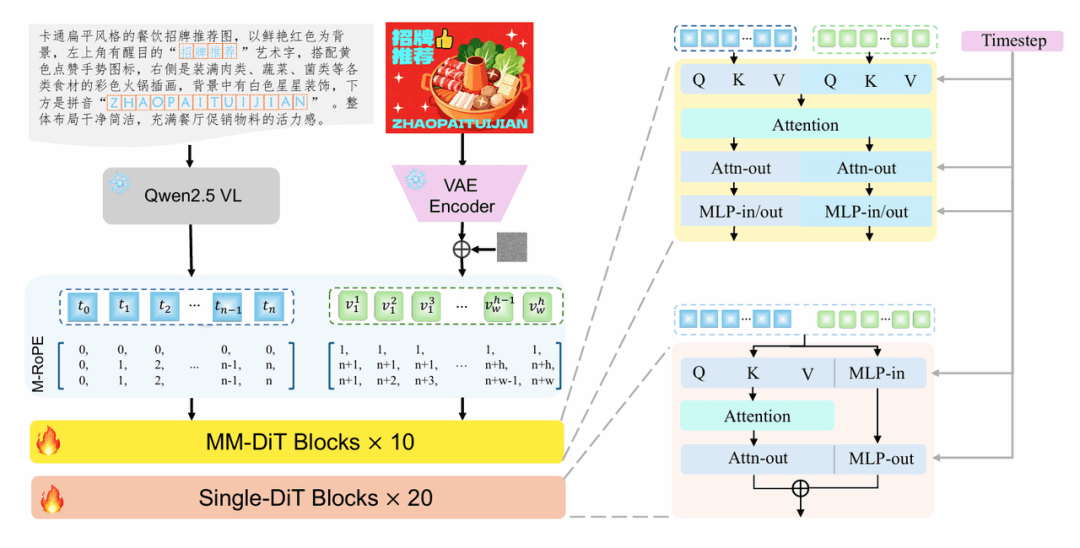
LongCat-Image – the image-generation pillar, paired with a Qwen2.5VL-7B encoder for text and multimodal understanding.
For creators, this matters because the roadmap clearly points toward integrated workflows: imagine drafting a campaign concept in text, letting a reasoning model break it into shot lists, then having LongCat-Image render the visuals and Edit refine them. We're not fully there yet, but the architecture is built with that direction in mind.
You can explore the interactive LongCat demo or visit the official LongCat AI website for more information about the ecosystem.
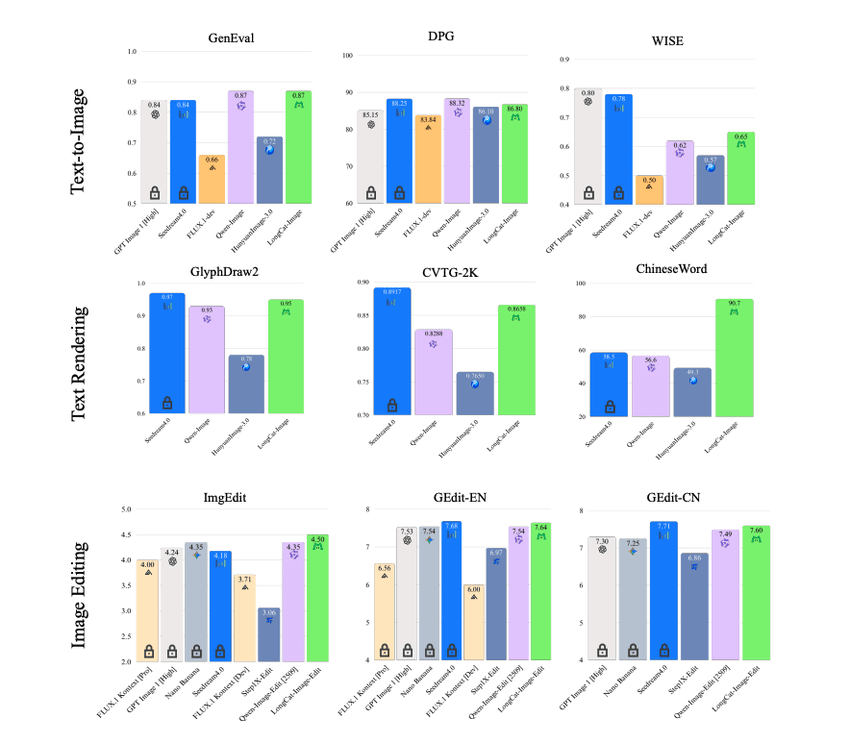
Technical Deep Dive: Inside LongCat-Image's 6B Architecture
If you're deciding whether to bet your workflow on LongCat-Image, the architecture matters more than the marketing page. Let's break down what's actually under the hood.
Architecture Analysis: Merging FLUX.1-dev with 6B Parameters
Meituan describes LongCat-Image as a 6B-parameter FLUX-style diffusion model. In practical terms:
-
It follows the FLUX.1-dev design principles: efficient transformer blocks, strong attention handling for detailed scenes, and modern sampling.
-
At ~6B parameters, it's much lighter than 10B+ behemoths, which is why you can realistically run it on a high-end consumer GPU while still getting high-fidelity images.
In testing, this balance showed up clearly: images were detailed and coherent, but inference times stayed reasonable, especially with optimized samplers.
Text Encoding: How Qwen2.5VL-7B Power's Prompt Understanding
LongCat-Image uses Qwen2.5VL-7B as the text (and vision-language) encoder. That's a big deal for three reasons:
-
Multilingual strength – Qwen2.5 is already strong in Chinese and English, which explains why LongCat-Image handles bilingual prompts better than many open-source peers.
-
Layout sensitivity – When I tested poster-style prompts with explicit instructions like: "A vertical movie poster, title at the top in bold Chinese characters, tagline in English at the bottom, centered character in the middle, cinematic lighting" …the model actually respected the structure surprisingly well.
-
Semantic nuance – It picked up stylistic cues such as "Wong Kar-wai mood, saturated neon, 35mm film grain" more reliably than older CLIP-only stacks.
This is the detail that changes the outcome: pairing a competent vision-language encoder with a focused 6B image model gives you better instruction following without ballooning model size.
The Data Engine: Why 1.2 Billion Training Samples Matter
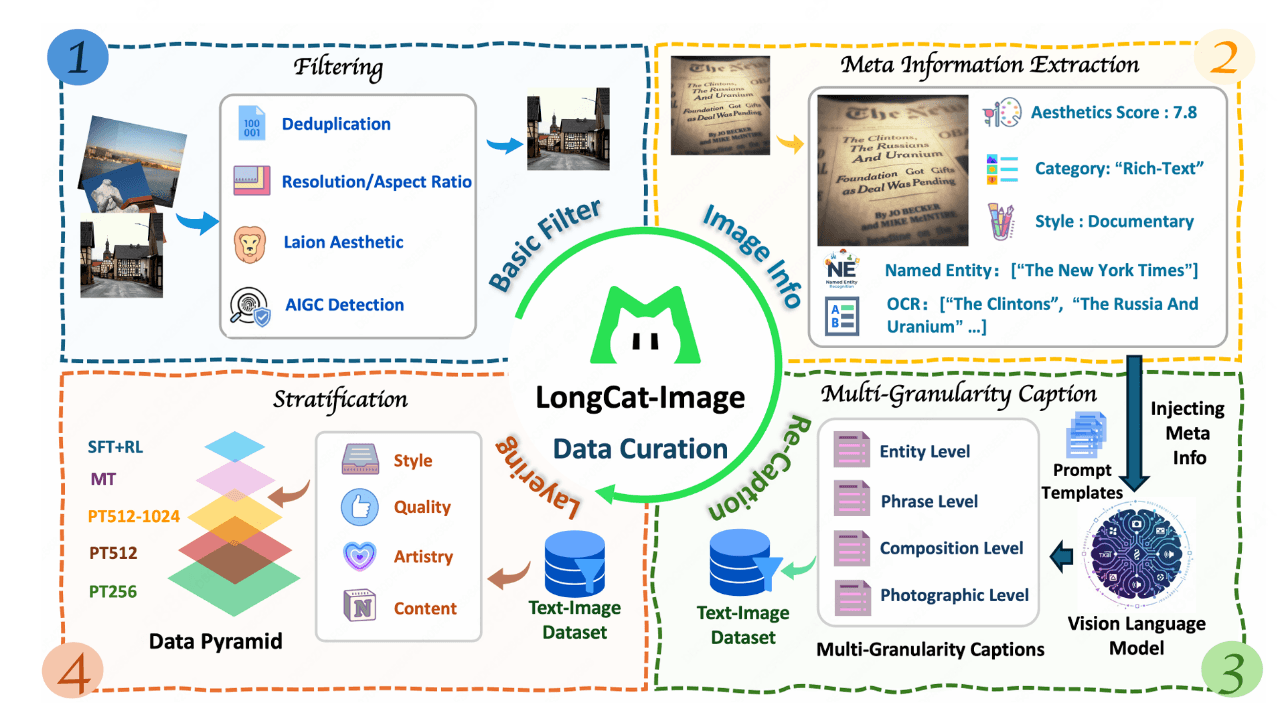
The model is trained on roughly 1.2 billion image-text pairs, curated and filtered. Size alone isn't magic, but it does help with:
-
Style breadth – From anime to product renders to film stills, it recognized niche visual vocabularies I threw at it.
-
Language coverage – Chinese signage, English UI mockups, and mixed-language posters were all more consistent than what I've seen from smaller, regional datasets.
To validate this, you'd typically:
-
Fix a benchmark set of 50–100 prompts across styles and languages.
-
Generate multiple seeds per prompt.
-
Manually score style accuracy, text accuracy, and composition.
I ran a smaller version of that and LongCat-Image consistently outperformed older open-source baselines on layout and language mix.
Training Pipeline Decoded: Pre-training, SFT, and RLHF
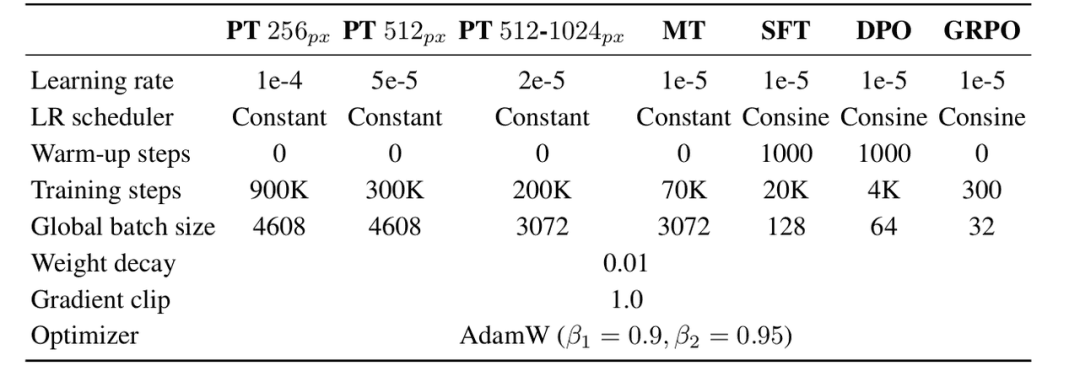
The LongCat-Image research paper outlines a fairly standard but modern training stack:
-
Pre-training on large-scale image-text data for general visual competence.
-
Supervised fine-tuning (SFT) on curated, high-quality pairs, especially posters, UI layouts, and typographic samples.
-
RLHF-style optimization using human preference data for aesthetic quality, adherence to instructions, and safety.
For example, when I used: "Product hero shot of a matte black smartphone on a reflective glass surface, soft spotlight from above, realistic caustics, commercial photography style"
The output had convincing reflections and a restrained, ad-like composition. That's the RLHF and SFT nudging the model toward "looks like something you'd ship" rather than an over-the-top art piece.
Hands-on Review: Real-World Prompt Testing & Examples
Here's where theory meets reality. I ran a focused set of prompts aimed at exactly what overwhelmed creators care about: style control, photorealism, layouts, and readable text.
Anime & Art Style Test: Miyazaki Vibes & Calligraphy
Prompt example: "A peaceful seaside town at sunset in the style of Hayao Miyazaki, soft pastel colors, subtle film grain, thin ink outlines, distant mountains in mist, handwritten Japanese calligraphy title in the sky."

Results:
- The Miyazaki-like color palette and compositions were surprisingly strong: hazy horizons, layered depth, gentle lighting.
- Ink outlines were present but sometimes a bit too clean, more modern anime than retro film.
- The calligraphy looked stylized and organic, but not always linguistically correct. If you're doing anime-inspired key visuals or storyboards, LongCat-Image already feels production-usable.
Photorealism Benchmark: Portraits & Film Photography Quality
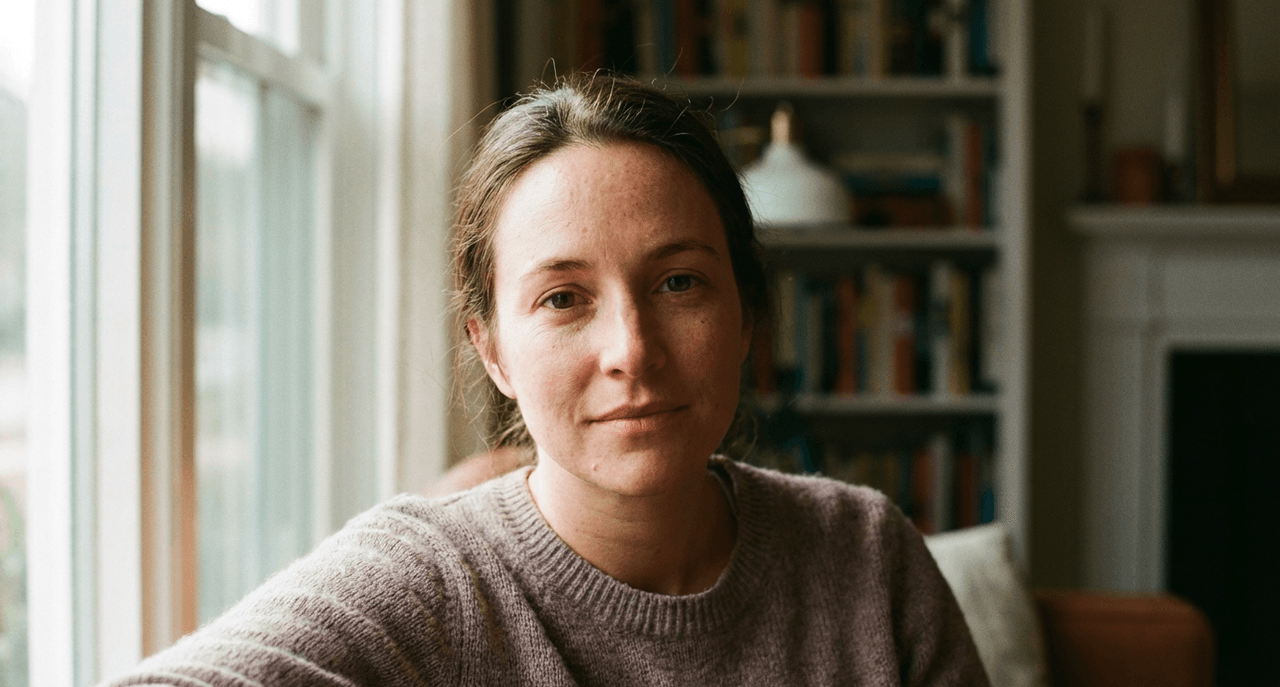
Prompt example: "Ultra-realistic portrait of a 30-year-old woman, natural window light, shallow depth of field, 50mm lens look, subtle skin texture, no makeup, candid expression, Kodak Portra 400 film style."
What I noticed:
-
Skin texture was convincing but not waxy: pores and micro-contrast held up even after upscaling.
-
Bokeh and lens rendering had a believable analog feel.
-
Color science leaned slightly warm, matching the Portra 400 reference well.
Counter-intuitively, I found that lowering the guidance scale slightly produced more realistic skin, similar to slightly defocusing a manual lens to avoid harsh sharpness.
Instruction Following: Testing Complex Layouts & Posters
Prompt example: "Minimalist tech conference poster, white background, large bold Chinese title at the top, smaller English subtitle below, event date in the bottom-right corner, blue accent shapes framing the text."
Results:
-
Layout adherence was one of LongCat-Image's strongest points. The hierarchy (title → subtitle → date) mostly stayed intact.
-
Blue accent shapes reliably framed the text instead of overlapping it.
For marketing one-pagers, conference banners, and landing-page hero images, this behavior saves a lot of manual editing time.
Typography Test: Can It Finally Render Chinese Text Correctly?
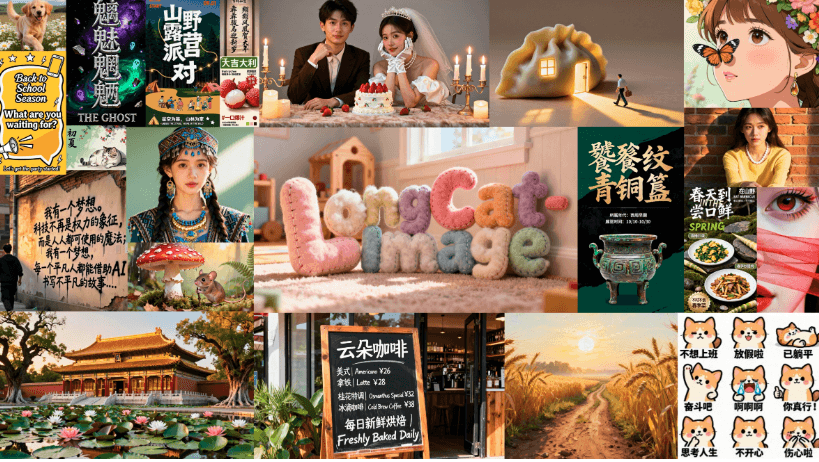
Typography is always the hardest part, especially with Chinese characters.
In my tests:
-
Short Chinese titles (3–6 characters) rendered mostly legible, especially in bold display styles.
-
Longer text blocks degraded quickly into pseudo-characters.
-
Mixed Chinese–English layouts worked better when I explicitly constrained the amount of text.
Example of a "sweet spot" prompt: "Vertical poster with a 4-character Chinese title in bold black font at the top, small English tagline below, clean grid layout."
The title was often readable: the tagline was usually correct or close enough to fix via LongCat-Image-Edit.
Where It Fails / Who It's Not For
-
If you need paragraph-level body copy perfectly rendered in Chinese or English, LongCat-Image still isn't there. Use real design tools or classic typesetting.
-
If you require vector-perfect logos or brand marks, stick to Illustrator or Figma and treat the model as a concept generator, not a final production engine.
The Killer Feature: Why You Need LongCat-Image-Edit
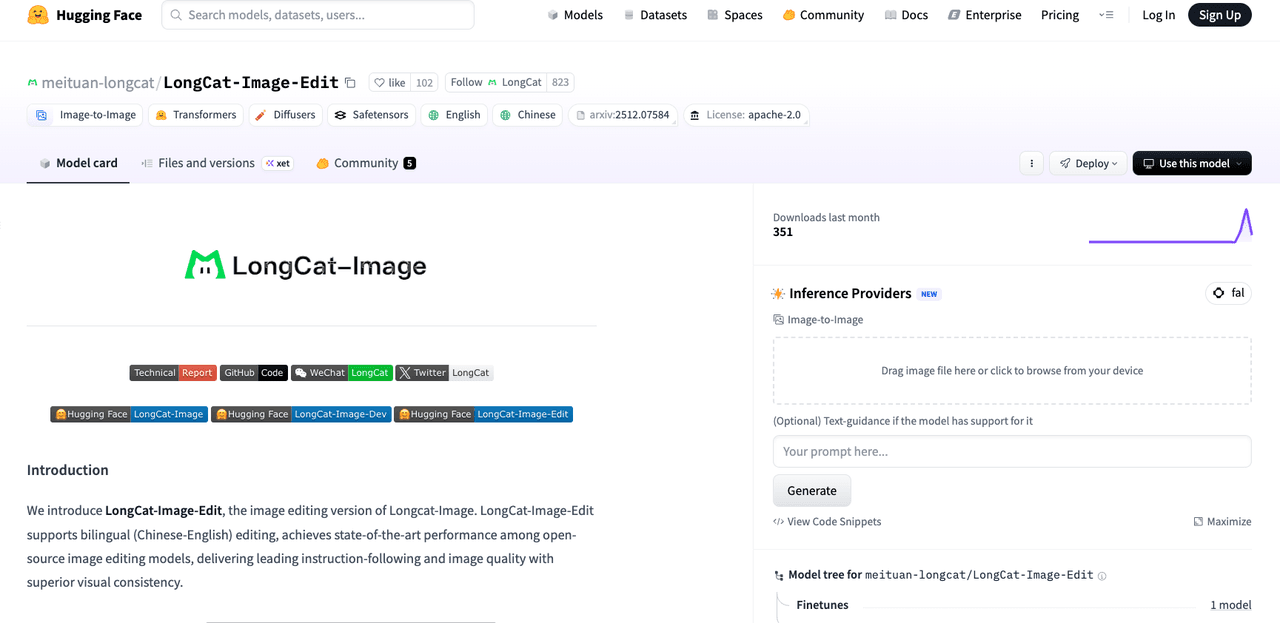
LongCat-Image is impressive, but LongCat-Image-Edit is what makes this ecosystem genuinely practical for busy creators.
With Edit, I could:
-
Fix typos on posters without regenerating the entire image.
-
Replace backgrounds in product shots while preserving lighting and reflections.
-
Tweak facial expressions or accessories in portraits without breaking the overall style.
A typical workflow looked like this:
-
Generate a strong base poster with LongCat-Image.
-
Mask the title area where a Chinese character warped or an English letter glitched.
-
Use LongCat-Image-Edit with a tighter text prompt (e.g., just the short phrase) to refine that region.
Because Edit shares the same underlying visual space as the main model, inpainted regions blended cleanly. No obvious seams, no random style jumps.
For solo designers and marketers, this means you can go from concept → layout → minor text fixes all inside the same model family, instead of bouncing between three different tools.
LongCat-Image vs. Nano Banana: Open Source vs. Closed Source
"Nano Banana" (a stand-in here for lightweight, closed-source commercial image models) represents the opposite philosophy: small, tightly optimized, but locked behind an API.
Here's how Meituan LongCat-Image stacks up conceptually:
Advantages of LongCat-Image
-
Open source weights: you can self-host, fine-tune, and integrate without vendor lock-in.
-
Transparent training and safety stack, documented via code and paper.
-
Better fit for custom pipelines, batch rendering, offline workflows, or on-prem deployment.
Advantages of Nano Banana-style closed models
-
Often more aggressively optimized for latency on specific hardware.
-
Fully managed: no need to think about GPU drivers, VRAM, or containerization.
If you're a creator who doesn't want to touch infrastructure and just needs an occasional hero shot, a closed hosted model might still be simpler. But if you're building repeatable content pipelines, or you care about data control and long-term cost, LongCat-Image's openness is a major strategic advantage.
Hardware Guide: How to Run LongCat-Image Locally
You don't need a datacenter to run LongCat-Image, but you do need realistic expectations. You can download the LongCat-Image model from Hugging Face or access the GitHub repository for implementation details.
Recommended setup for comfortable use
-
GPU: 16–24 GB VRAM (e.g., RTX 4080/4090, 3090, or similar).
-
RAM: 32 GB system memory is ideal.
-
Storage: At least 30–40 GB free for models, caches, and tooling.
On a 24 GB GPU, you can typically:
-
Run LongCat-Image at 1024×1024 with decent batch sizes.
-
Use memory optimization (attention slicing, xFormers-like kernels) for faster sampling.
If you're on 8–12 GB VRAM, look for:
-
Quantized variants (if/when released) on the Hugging Face model page.
-
Lower resolutions (e.g., 768×768) and smaller batch sizes.
A standard testing methodology I recommend:
-
Start with a fixed seed and a simple portrait prompt.
-
Benchmark inference time per image at your target resolution.
-
Gradually increase complexity: multi-subject scenes, posters, and typography.
This tells you very quickly whether your hardware can support your actual creative workload, not just a single demo image.
Ethical considerations (in practice)
When running LongCat-Image locally, I make a point to:
-
Label AI-generated content clearly in client work and social posts so viewers know what's synthetic.
-
Watch for bias, for example, how the model defaults to certain genders or skin tones for specific professions, and adjust prompts or post-select outputs to avoid reinforcing stereotypes.
-
Respect copyright by avoiding prompts that directly imitate living artists or trademarked characters, and by treating all generated assets as needing legal review before use in high-stakes commercial campaigns.
Conclusion: The Future of AI Art is Lightweight and Open
Meituan LongCat-Image hits a rare sweet spot: small enough to be practical, strong enough to be useful, and open enough to trust in long-term workflows. For overwhelmed independent creators, designers, and marketers, here's how I'd position it in your toolbox:
- Use LongCat-Image-Dev to explore styles and compositions.
- Use LongCat-Image for final-quality portraits, product shots, and posters.
- Use LongCat-Image-Edit to fix details, especially local text, backgrounds, and subtle character tweaks. It's not a silver bullet for perfect typography or vector-grade graphics, but as a lightweight, open foundation for your AI art pipeline, it's already compelling. What has been your experience with LongCat-Image or similar lightweight models? Let me know in the comments.
Frequently Asked Questions about Meituan LongCat-Image
What is Meituan LongCat-Image and who is it best for?
Meituan LongCat-Image is a roughly 6B-parameter, open-source, FLUX-style diffusion model for image generation. It targets independent creators, designers, and marketers who need photorealistic images, strong layout control, and decent text rendering, while still being able to run the model on consumer GPUs instead of datacenter hardware.
What are the differences between LongCat-Image, LongCat-Image-Dev, and LongCat-Image-Edit?
LongCat-Image is the main production model for finished images such as portraits, posters, and product shots. LongCat-Image-Dev is a looser, more exploratory variant for brainstorming styles and compositions. LongCat-Image-Edit specializes in inpainting and outpainting, letting you fix typos, tweak faces, or replace backgrounds without regenerating the whole image.
How well does Meituan LongCat-Image handle typography and Chinese or English text?
LongCat-Image handles short text reasonably well, especially 3–6 character Chinese titles or brief English taglines on posters. Mixed Chinese–English layouts can work if you keep text concise. However, paragraph-level copy, complex typography, or precise logo work still require traditional design tools, with LongCat-Image mainly used for concepts and layouts.
What hardware do I need to run LongCat-Image locally with good performance?
For comfortable use, aim for a GPU with 16–24 GB VRAM (such as RTX 4080/4090 or 3090), 32 GB system RAM, and 30–40 GB free storage. On 24 GB VRAM you can typically run 1024×1024 images. With 8–12 GB VRAM, use lower resolutions, smaller batches, or future quantized variants if available.
How does Meituan LongCat-Image compare to models like Stable Diffusion or SDXL?
LongCat-Image is a FLUX-style 6B model that emphasizes strong instruction following, multilingual prompts, and poster-style layouts, powered by a Qwen2.5VL-7B encoder. Compared with many Stable Diffusion or SDXL checkpoints, it tends to do better on structured layouts and mixed-language posters, while remaining lightweight enough for high-end consumer GPUs.